
On the Dashboard tab of your organiser dashboard you will find an overview of all your event's key dates, along with your goals and statistics in real time:
Under the name of your event you will find the dates on which interviews will be held, not to be confused with the dates of the appointment booking phase (even though these may coincide if your event does not have automatic appointments).
COMPANY REGISTRATION & PREPARATION COLUMN
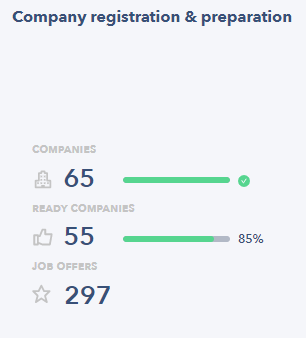
The Company Registration and Preparation column shows you:
- The total number of companies registered for your event (+ percentage of attained target set with your Seekube project manager).
- The total number of companies considered ready and visible to candidates (+ percentage of attained target set with your Seekube project manager).
- The total number of jobs posted at your event.
🚨 A company can only be counted in the total number of prepared companies if the blue tick to the left of the row (on the the Companies tab) has been manually enabled by you or your Seekube project manager. Read this article to find out more about tracking company preparation at your job fair.
💡 To be considered ready, a company must have published its stand and must have a recruiter with at least one job offer and availability slots in their calendar. For example, in the image below, 55 out of 65 participating companies are considered ready.
CANDIDATE REGISTRATION COLUMN
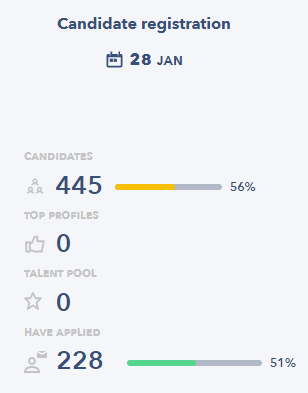
The Candidate Registration column shows:
- The date that candidates log in to the platform.
- The total number of unique candidates registered for the event (+ percentage of attained target set with your Seekube project manager).
- The total number of unique candidates who applied for at least one job at the event (+ percentage of all candidates registered at the event).
APPOINTMENT BOOKING PHASE COLUMN
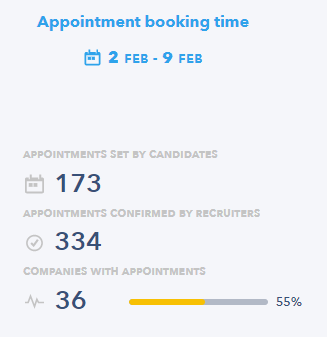
Lastly, the Appointment Booking Phase column shows you:
- The dates during which candidates can apply for jobs by requesting interviews (not to be confused with the dates during which the interviews are held, even if these may coincide if your event does not have automatic appointments).
- The total number of appointments booked by candidates that have not yet been confirmed by recruiters.
- The total number of appointments that have been confirmed by recruiters (+ percentage of attained target set with your Seekube project manager).
- The total number of companies that have at least one recruiter with at least one confirmed appointment (+ percentage of attained target set with your Seekube project manager).
💡 For more detailed statistics about your event, go directly to the Statistics tab of your organiser account.
🖇 Feel free to navigate the Help Center created for your recruiters and candidates via this link : help.seekube.com !