
The Statistics tab allows you to view your event data in real time, divided into different sections:
- An Activity Summary for your event
- A tab with all your candidate data
- A tab with all your company data
- And finally, a tab ranking your company activity
💡 All this data can be exported and used.
ACTIVITY SUMMARY
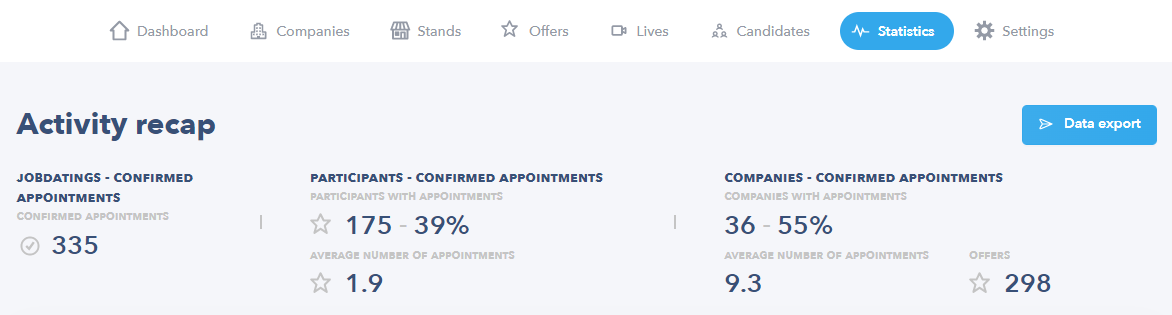
The header of your Statistics tab gives you an overview of the key figures for your event (from left to right):
- The total number of confirmed appointments, i.e. the number of appointments confirmed by recruiters.
- The number of unique candidates with at least one confirmed appointment (+ percentage of all candidates registered for the event).
- The average number of appointments per candidate out of the candidates with at least one confirmed appointment.
- The number of companies with at least one recruiter with at least one confirmed appointment (+ percentage of all companies taking part in the event).
- The average number of appointments per company out of the companies with at least one confirmed appointment.
- The total number of jobs posted at the event.
CANDIDATE SECTION
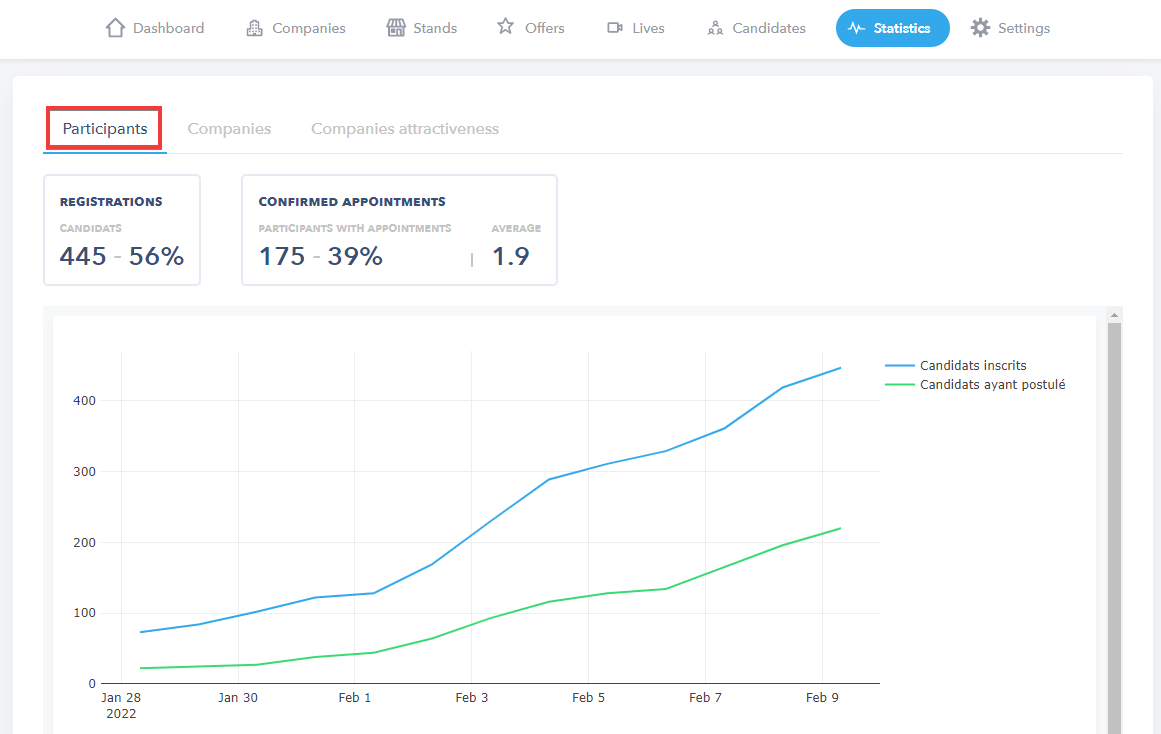
- REGISTRATION BLOCK
| Candidates | Total number of unique candidates registered for your event (+ percentage of attained target set with your Seekube project manager). |
- CONFIRMED APPOINTMENT BLOCK
| Candidates with appointments | Number of unique candidates with at least one confirmed appointment (+ percentage of all candidates registered at the event). |
| Average | Average number of appointments per candidate out of the candidates with at least one confirmed appointment. |
- Time chart showing the progression of the number of participants and the number of candidates who applied for at least one job.
COMPANY SECTION
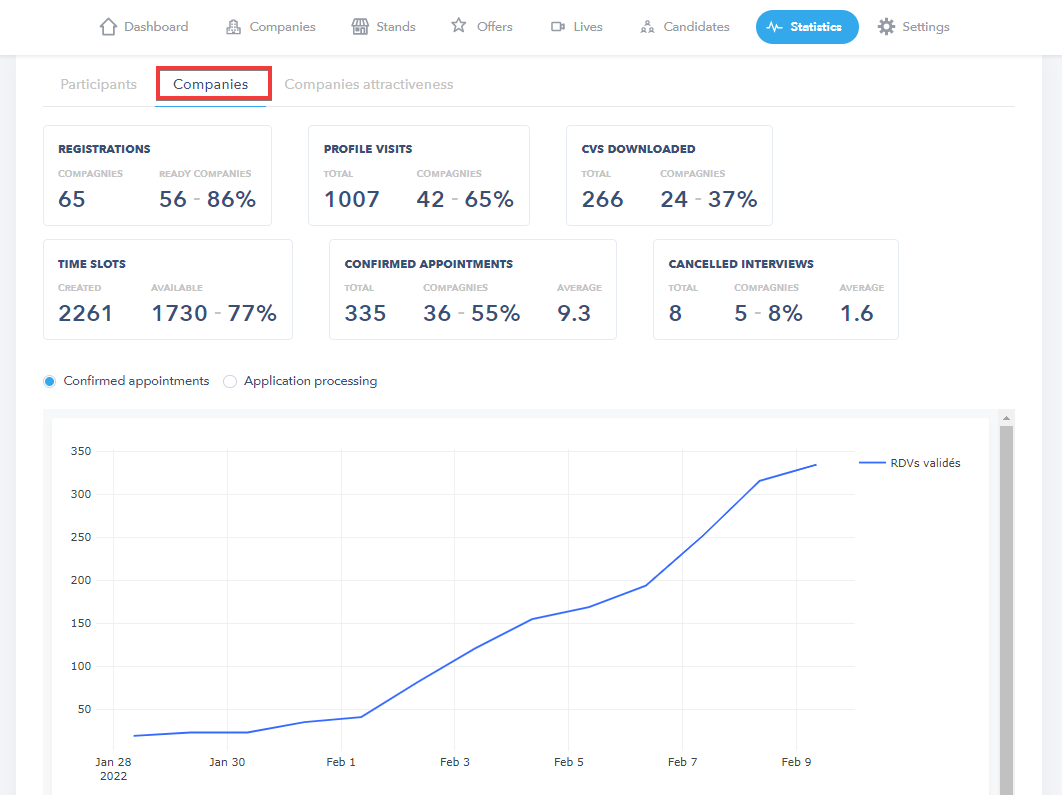
- REGISTRATION BLOCK
| Companies | Total number of participating companies registered for your event |
| Prepared companies | Total number of companies considered ready for your event (+ percentage of all participating companies). |
👉 A company is considered ready when at least one recruiter can be found by candidates (i.e. has completed the 3 preparatory steps). Important note! A company will only be counted once the blue tick in its row (on the the Companies tab of your dashboard) has been manually enabled by you or your Seekube project manager. Read this article to find out more.
- PROFILE VIEWING BLOCK
| Total | Total number of visits to candidate profiles. |
| Companies | Total number of companies that have viewed at least one candidate profile (+ percentage of all participating companies). |
- DOWNLOADED CV BLOCK
| Total | Total number of unique CVs downloaded by participating companies. |
| Companies | Total number of companies that have downloaded at least one CV (+ percentage of all participating companies). |
- TIME SLOT BLOCK
| Created | Total number of time slots created by recruiters registered for the event |
| Available | Total number of time slots still available (+ percentage of all time slots created by recruiters). |
- CONFIRMED APPOINTMENT BLOCK
| Total | Total number of appointments confirmed by recruiters. |
| Companies | Total number of companies with at least one recruiter with at least one confirmed appointment (+ percentage of all companies that downloaded at least one CV out of all companies registered). |
| Average | Total number of confirmed appointments out of the total number of companies with at least one recruiter with at least one confirmed appointment. |
- CANCELLED APPOINTMENT BLOCK
| Total | Total number of appointments cancelled by recruiters. |
| Companies | Total number of companies that cancelled at least one appointment (+ percentage of all companies with at least one recruiter with at least one confirmed appointment). |
| Average | Total number of cancelled appointments out of all companies that cancelled at least one appointment. |
- Time chart showing the progression of the number of appointments confirmed by recruiters.
COMPANY ATTRACTIVENESS SECTION
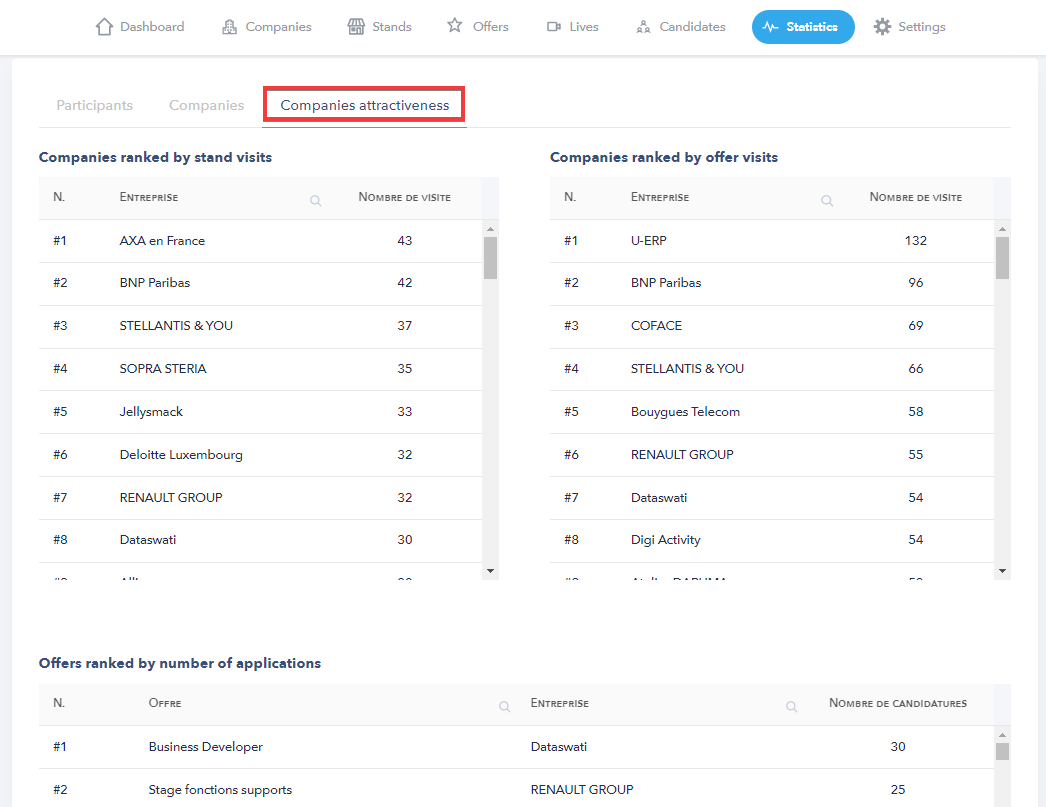
The Company Activity section has three lists:
- A ranking of the companies whose stands were visited the most.
- A ranking of the companies whose job offers were visited the most.
- A ranking of the job offers that received the most applications.
EXPORTING DATA
The Data Export button can be used to download different data about your event in Excel format (.xlsx):
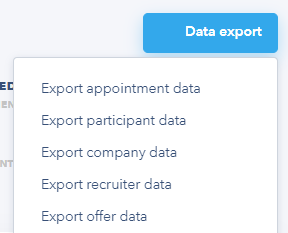
These exports allow you to retrieve and use all the data about appointments, candidates, companies, recruiters and jobs posted at your event.
👉 In the table below, you'll find the vocabulary you need to interpret and use this exported data:
| Confirmed interviews | Appointments confirmed by recruiters |
| Booked interviews | Number of time slots booked by candidates awaiting confirmation by recruiters (only applies to events with automatic appointments) |
| Pending interviews | Appointment requests made by recruiters awaiting a response from the candidates |
| Automatic confirmations | Appointments automatically confirmed on the appointment booking closing date (only applies to events with automatic appointments) |
| Applications | Number of applications made by candidates awaiting a response from recruiters (only applies to events with regular appointments) |
| Cancelled appointments | Total number of confirmed appointments subsequently cancelled by the recruiter or candidate (see title of export column) |
| Declined appointments | Total number of appointment requests declined by the recruiter or candidate (see title of export column) |
| Sourcing appointments | Total number of appointment requests made to candidates by recruiters from the Sourcing tab |
| Total appointments | Total number of appointments requested by recruiters OR candidates (whether subsequently accepted or declined) |
💡 For events with automatic appointments, candidates book interview time slots in advance, which are then processed by the recruiters ; an appointment booking closing date is set, which is when any pending appointment requests are confirmed. For events with classic appointments, all applications must be processed by the recruiter, who will invite candidates to book a time slot (if the applications are not processed by the recruiter, they will not receive a response).
🖇 Feel free to navigate the Help Center created for your recruiters and candidates via this link : help.seekube.com !